MCP connector data flow and hosting
Updated 6 November 2026
/agent-integrations/mcp-connector/security/data-flow-and-hosting
MCP connector data flow and hosting
The question and the conversation stay with your AI tool. TechWolf receives only the tool call, returns only data the person can already see in the TechWolf Console, and runs the connector in the AWS region that holds your TechWolf data.
How it works
The Model Context Protocol (MCP) is an open standard that lets an AI tool call outside tools. The AI tool's model decides when to call a TechWolf tool and what to ask, then uses the result in its answer. The connector is TechWolf's remote MCP server, reached over streamable HTTP on HTTPS. It never writes and runs no AI model.
One tool call
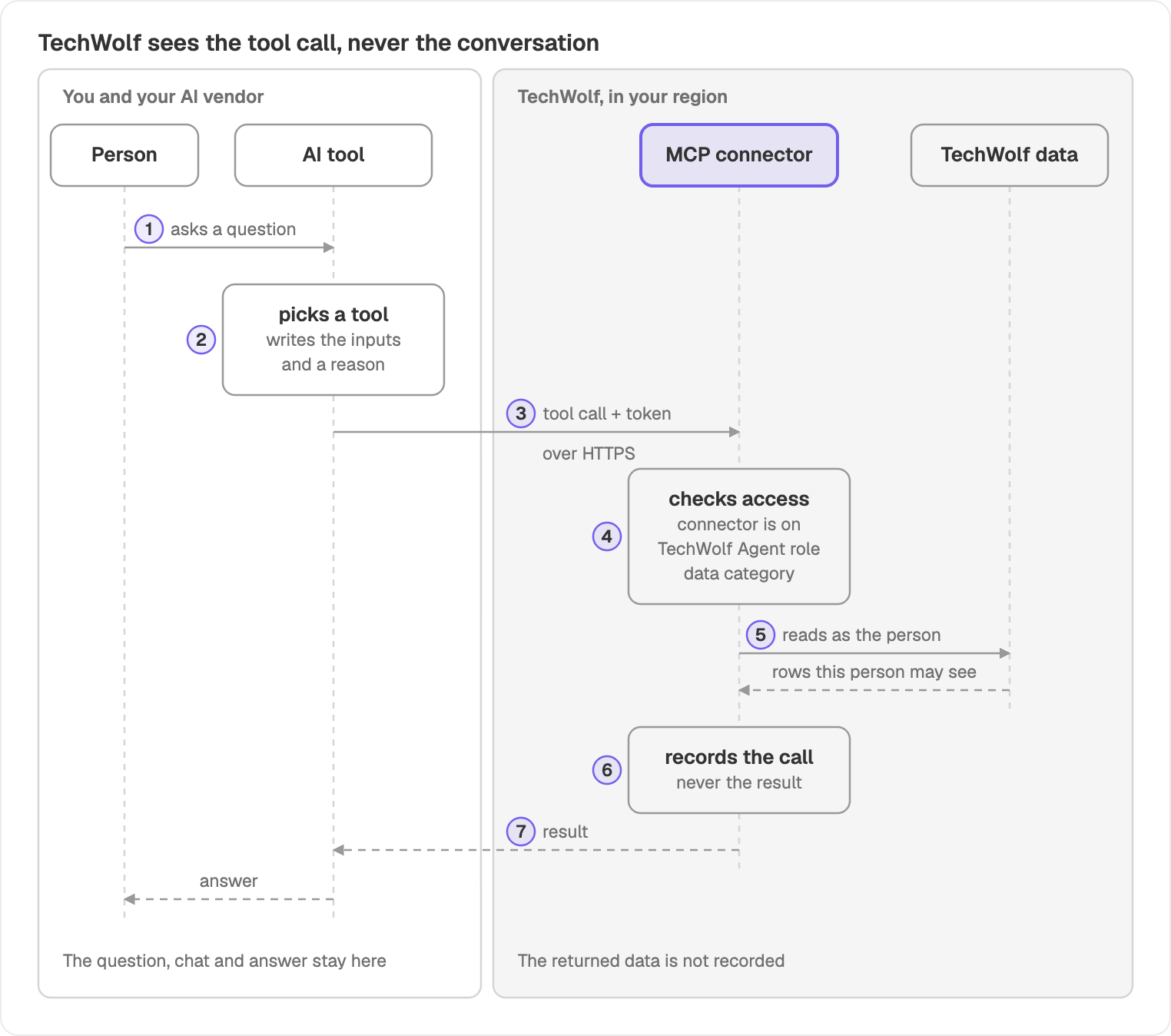
The numbers match the steps below. A market search follows the same path, but step 5 sends only the search terms to TechWolf's index of public job postings.
- A person asks their AI tool a question. The question, the chat history and any files stay with the AI tool's vendor.
- The AI tool's model picks a TechWolf tool and writes its inputs, such as a job ID or a search term. It adds a one-sentence reason for the call, usually the person's question, and is instructed to leave personal data out of it.
- The AI tool sends the call over HTTPS with an access token for that one person.
- The connector checks the call: the token is valid, the connector is switched on for the organisation, and the person has the TechWolf Agent role and access to that kind of data.
- It reads the data as that person. TechWolf's data service returns only the rows the person's Console data roles allow. A market search sends only its search terms to TechWolf's index of public job postings, with no organisation or person identity.
- It records the call: who made it, when, from which AI tool, which tool, its inputs and its status (success, denied or failed). The data the tool returned is not recorded.
- The result goes back to the AI tool, which writes the answer. From here, your agreement with the AI tool's vendor governs the data.
| Stays with your AI tool's vendor | Reaches TechWolf |
|---|---|
| The person's question and the chat history | The tool name and its inputs |
| Files, memory and other connectors' data | The one-sentence reason for the call |
| The model's reasoning and its final answer | The person's identity, from their token |
| The AI tool's name, session ID and network address |
What the connector reads
The tools read three kinds of your data, behind the same data access as in the Console, plus TechWolf's index of public job postings:
- Skill Supply: employees and their inferred skill profiles.
- Skill Demand: jobs and the skills they require.
- Tasks on Jobs: each job's tasks, their AI impact and which jobs have similar work.
- Market data: TechWolf's index of public job postings, open to everyone with the TechWolf Agent role.
MCP connector tools lists every tool, what it reads and the data access it needs.
What the connector never does
- Create, change or delete data.
- Send email, messages or files anywhere.
- Fetch web pages or URLs, or accept file uploads.
- Run code. Analytical questions run as one read-only query over your own export tables.
- Connect to your HR system or other software. It reads only what is already in your TechWolf tenant.
Where it runs
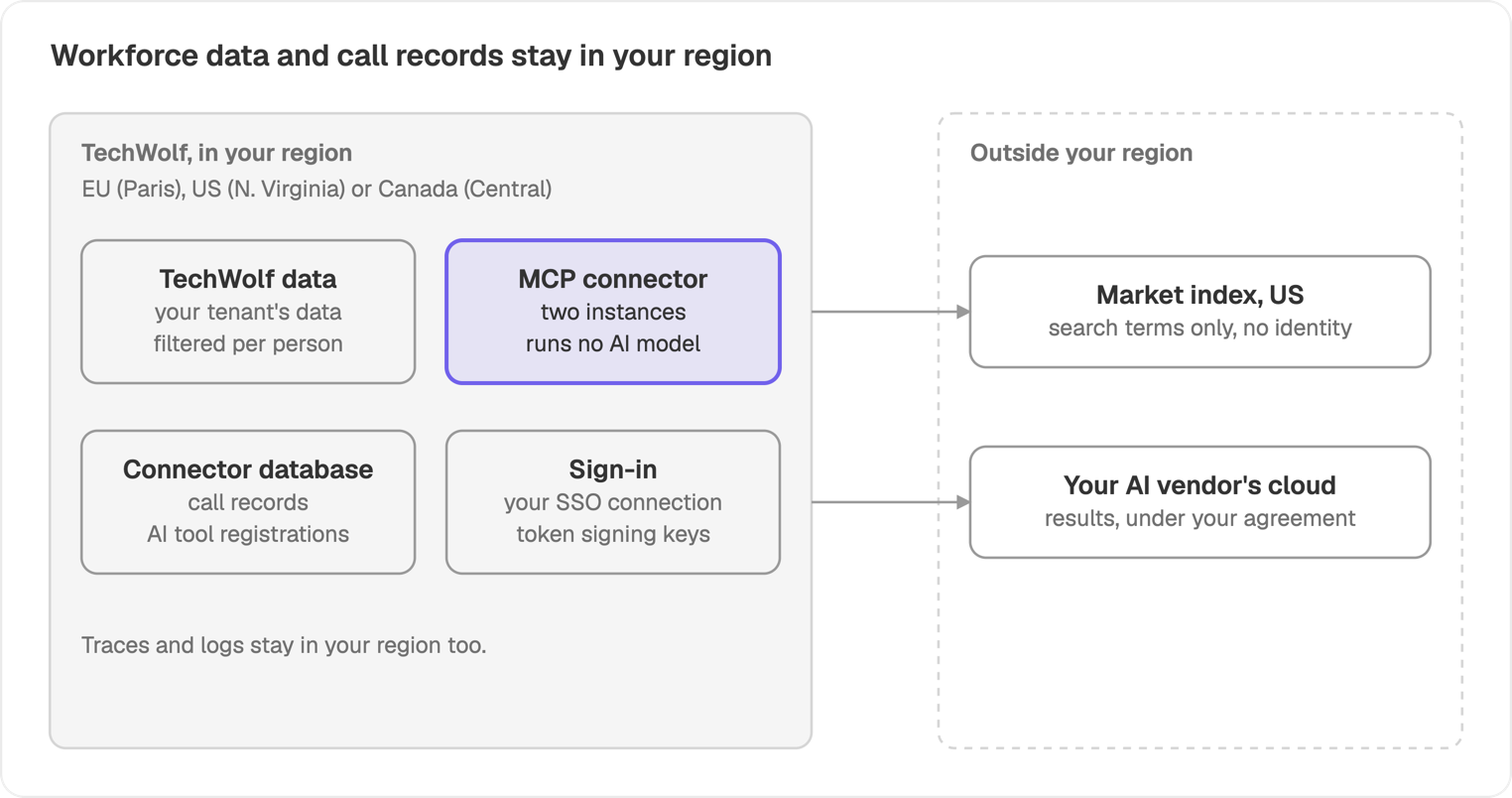
Each organisation is served from the AWS region that holds its TechWolf data. Your workforce data and call records stay in that region.
| Your region | AWS region | Connector address |
|---|---|---|
| EU | Europe (Paris), eu-west-3 | https://<your-organisation>.eu3.techwolf.ai/mcp |
| US | US East (N. Virginia), us-east-1 | https://<your-organisation>.us3.techwolf.ai/mcp |
| Canada | Canada (Central), ca-central-1 | https://<your-organisation>.ca1.techwolf.ai/mcp |
In each region, the connector runs as two instances behind a load balancer, with its database in the same region. Sign-in runs on a separate sign-in service per region.
What leaves your region
- Market search terms. TechWolf's index of public job postings is hosted in the US. A market search sends only the search terms the AI tool wrote, with no organisation or person identity. If your TechWolf data is in the US, market search stays in your region.
- Results, to your AI tool. The AI tool's vendor processes what the connector returns wherever your agreement with that vendor says.
Service providers
| Provider | What for | What it receives | Where |
|---|---|---|---|
| Amazon Web Services | Hosting and database | All connector data | Your region |
| Okta (Auth0) | Sign-in | The identity of people who sign in | A separate sign-in service per region, hosted in the same geography: EU, US or Canada |
| Your AI tool's vendor | Runs the model | Results the connector returns | Set by your agreement with them |
Network
- One address per organisation, over HTTPS only. TLS ends at TechWolf's load balancer in your region.
- Calls come from your AI vendor's cloud, not from your network. Each call must carry a valid token for a signed-in person.
- During sign-in, the person's browser opens the connector address, TechWolf's sign-in pages on
techwolf.aiand your organisation's own sign-in page. - Nothing is installed on devices or in your network.
- Outbound, the connector calls only fixed TechWolf services. No tool takes a web address.
- MCP gateways work when they forward each person's own sign-in, from the same directory as your Console users, not a shared credential. TechWolf checks compatibility with the specific gateway before rollout.